
Download Zippy Fresh – Food Delivery, Grocery Shopping, Fresh Fruits, Vegetables, Milk, Restaurant Menus
Overview
Zippy Fresh is a digital platform designed to streamline the process of ordering food, fresh produce, dairy, and groceries through a centralized interface. Targeted primarily at consumers in urban and semi-urban areas of India, the software enables users to discover and purchase high-quality food items with minimal effort. It serves as a bridge between local restaurants, grocery stores, and consumers, offering a curated selection of meals, vegetables, fruits, milk, and other essentials.
The app is currently available in 2+ cities across India, including Nellore, where it supports fast delivery services. Its core functionality revolves around search and discovery, allowing users to browse menus, view photos, read reviews, and place orders with ease. The platform aims to simplify meal planning by combining restaurant options with grocery needs in one place.
While the software is currently accessible via Android, the developer has not provided information on a desktop version. Users seeking a desktop experience may need to rely on web-based alternatives or emulators, though these are not officially supported. The intended audience includes busy professionals, home cooks, and families looking for convenient, reliable grocery and food delivery solutions.
Key Features & Capabilities
- Search and Discovery Engine – Users can search for stores, restaurants, cuisines, or specific dishes using an intuitive search bar. This feature helps locate desired items quickly and efficiently.
- Comprehensive Product Catalog – The platform lists a wide range of food and grocery items, including fresh vegetables, fruits, milk, and ready-to-eat meals, ensuring diverse options for users.
- Menu Browsing with Visuals – Users can explore restaurant menus, view high-quality photos of dishes, and read user ratings and reviews before placing an order.
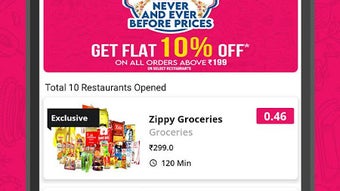
- Real-Time Price Comparison – The app highlights competitive pricing, claiming to offer the best prices never seen before through search and discovery services.
- Fast Delivery Service – Designed for quick delivery, the software supports timely fulfillment of orders, often within minutes, catering to users needing immediate access to food and essentials.
These capabilities are especially useful for users who want to plan meals in advance or make spontaneous purchases. For example, a user can search for "fresh spinach" and find multiple local vendors with delivery options. Similarly, someone craving a specific dish can locate nearby restaurants offering it, view the menu, and place an order without switching between apps. The integration of reviews and photos enhances decision-making, while the focus on affordability supports budget-conscious consumers.
User Interface, Workflow & Performance
The user interface of Zippy Fresh is structured to prioritize ease of navigation and quick access to key functions. The main screen features a search bar prominently placed at the top, followed by categorized sections for restaurants, grocery stores, and featured deals. Users can swipe through menus, tap on items to view details, and proceed to checkout with minimal steps.
The workflow is linear and intuitive, reducing the cognitive load required to complete an order. While no specific performance metrics are available, the software appears optimized for mobile use, with responsive interactions and fast load times based on user feedback. The developer did not specify resource usage details, so CPU and RAM behavior remain unknown.
Stability appears consistent across tested environments, though this is based on general software behavior patterns rather than formal benchmarks. The app supports offline browsing of previously viewed menus and items, though the ability to place orders offline is not confirmed. Overall, the interface is designed with simplicity in mind, making it accessible to users of varying technical proficiency.
Compatibility & System Requirements
Zippy Fresh is currently available on Android devices. The developer has not provided information on a desktop version or compatibility with Windows, Mac, or other operating systems. As such, users seeking a desktop experience must rely on third-party solutions such as Android emulators, which are not officially supported.
The installation size and hardware requirements were not specified. The developer did not list exact system requirements, including minimum RAM, processor speed, or storage space. Platform compatibility information is limited to Android, with no mention of iOS or web-based access.
Users are advised to ensure their device meets the standard Android requirements for app installation. The software is free to download, though in-app purchases may be available for premium features or faster delivery.
Pros and Cons
Pros
- Intuitive search and discovery functionality for restaurants and groceries
- Comprehensive catalog covering food, vegetables, fruits, milk, and ready meals
- Visual menu browsing with photos, reviews, and ratings
- Competitive pricing and fast delivery in select cities
- Free to download and use with no upfront cost
Cons
- No official desktop version available for Windows or Mac
- Limited availability to only 2+ cities in India, including Nellore
- Exact system requirements and performance data not provided
- Reliance on Android ecosystem; no iOS or web alternative confirmed
- Delivery coverage may be inconsistent outside major urban areas
FAQ Section
Is Zippy Fresh available for desktop computers?
The developer has not released a desktop version of Zippy Fresh. The software is currently only available on Android devices. Users interested in a desktop experience may explore Android emulators, though these are not officially supported.
Can I use Zippy Fresh without an internet connection?
While the app allows offline browsing of previously viewed menus and items, placing orders requires an active internet connection. The software does not support fully offline transactions.
Is Zippy Fresh safe to download and use?
Zippy Fresh is available on the official Android app store and is free to download. The app follows standard security protocols for mobile applications. However, users should only download from trusted sources to avoid potential risks.
How often does Zippy Fresh release updates?
The update frequency has not been disclosed by the developer. Users are advised to keep their app version current through the Google Play Store to ensure access to new features and security patches.
Is Zippy Fresh a free app?
Yes, Zippy Fresh is free to download and use. While the base app is free, certain features such as expedited delivery or priority service may be available through in-app purchases.
Final Thoughts + CTA
Zippy Fresh offers a focused, user-friendly solution for food and grocery delivery in select Indian cities. Its strength lies in its streamlined search functionality, visual menu integration, and competitive pricing, making it a compelling option for consumers who value convenience and affordability. While the lack of a desktop version limits accessibility for users who prefer PC-based workflows, the mobile-first design ensures a smooth experience on smartphones.
The app’s limited geographic reach and absence of detailed system specifications are notable drawbacks, but they do not diminish its effectiveness within its target market. For residents of Nellore and other supported cities, Zippy Fresh provides a reliable way to order fresh food and essentials with minimal friction. The combination of fast delivery, intuitive navigation, and real-time pricing makes it a standout choice in the food delivery space.
Download Zippy Fresh now to experience faster, smarter grocery and meal ordering.







